Built on SAP Business One, not around it.
SAP keeps doing what it does well: accounting, inventory and invoicing. TranzSales gives your team and your customers a fast way to work with the same data, and keeps SAP up to date as they go.
Read from SAP, written back to SAP.
From SAP into TranzSales
- Products. Items, item groups and brands, with their units and barcodes
- Prices. Price lists, special prices and discount groups
- Stock. Stock levels by warehouse
- Customers. Business partners with addresses, contacts and payment terms
- Sales history. Sales orders, invoices and credit notes
- Logistics. Deliveries, returns and return requests
- Money. Incoming payments and open balances
- Purchasing. Vendors, the vendor item codes you keep in SAP, and tax codes, for purchasing import
From TranzSales into SAP
- Sales orders. From reps, the office and the customer portal, once approved
- Incoming payments. Collected in the field, checked and posted by the office
- Return requests. Raised by reps and decided by the office
- Activities. Visits and calls, recorded as SAP activities
- Purchase documents. Approved vendor invoices and POs, as drafts, A/P invoices, goods receipts or purchase orders
Quiet when it works, clear when it doesn't.
On a schedule you set
Each sync job runs on its own schedule, and anyone allowed can also run it straight away.
Only what changed
After the first full sync, jobs fetch what changed since the last run, so they're quick and light on SAP.
Tries again by itself
If SAP is busy or restarting, documents wait and are sent again automatically until SAP accepts them.
Tells you when to look
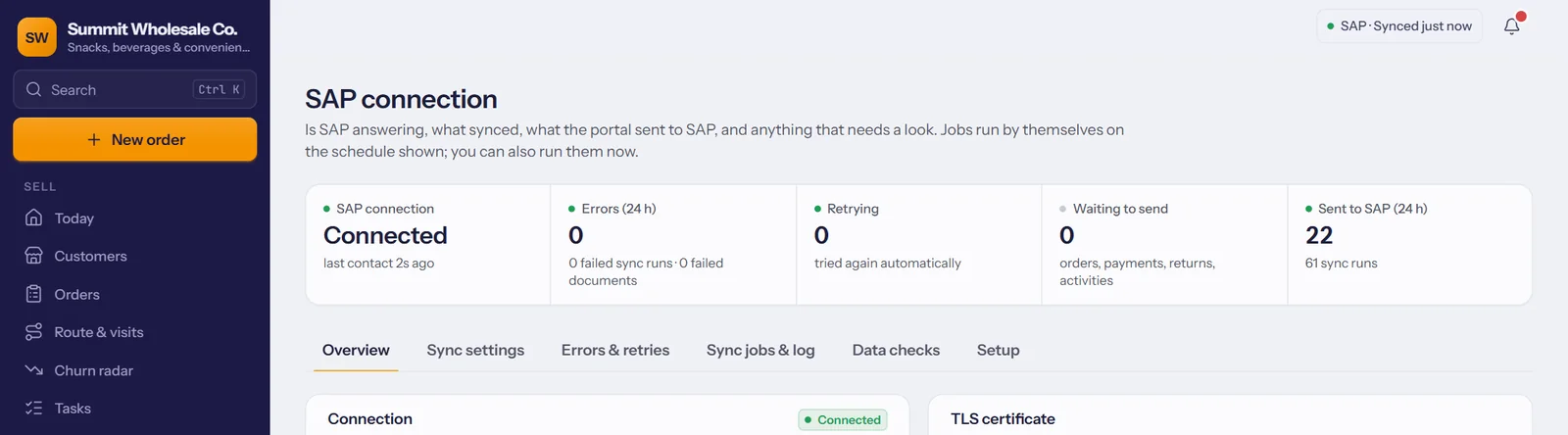
The SAP connection screen shows what's waiting, retrying, failed or sent, and flags a job that hasn't run for longer than usual.
Before we connect.
- SAP Business One with the Service Layer available, on your own server or at your hosting partner.
- The Service Layer reachable over the internet, so TranzSales can connect. Your SAP partner can arrange this; we'll walk them through it.
- An SAP user for TranzSales. Its password is stored encrypted, separately for each company.
- Your reps linked to their SAP sales employees, so each one sees their own customers.
We test the connection with you before anything goes live, and you can watch every sync on the SAP connection screen from day one.
Questions about your SAP setup?
Book a demo and bring your SAP partner along if you like.